Navigating workspaces & modules
Sherpa OS is organized into four modules — Connect, Content Engine, Clients, and RIA Data — each covering a distinct part of your practice. This article explains how to switch between them and how owners can control which modules are active for your organization.
Getting there
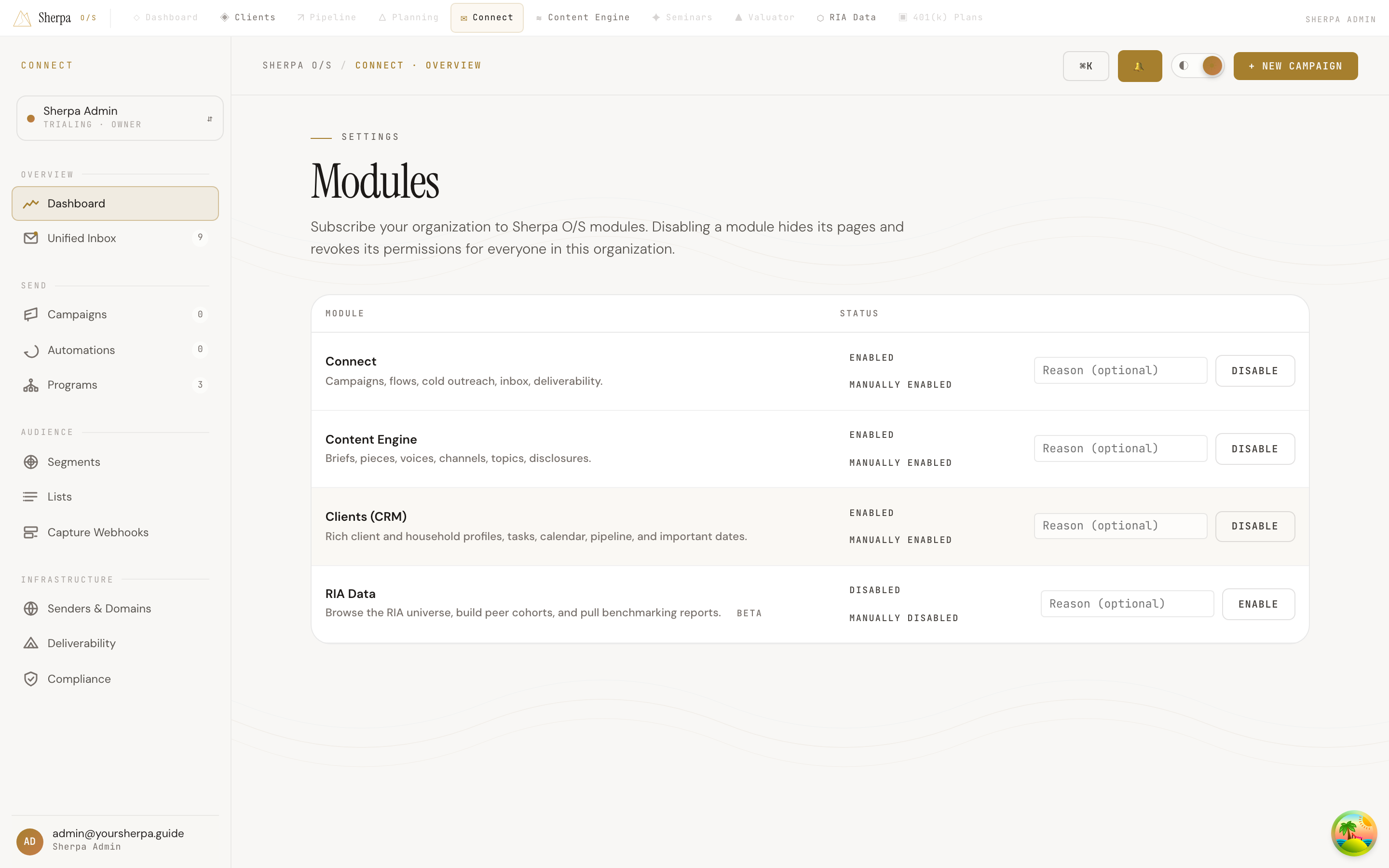
Section titled “Getting there”Use the module bar at the top of any page to jump between modules. To manage which modules are turned on or off, go to Settings → Modules.
Only organization owners (or members with the
org:modules:managepermission) can change module subscriptions. If you see a message that you need that permission, contact an owner on your account.
What you can do
Section titled “What you can do”Switch between modules
Section titled “Switch between modules”The module bar at the top of the app lets you move between Connect, Content Engine, Clients, and RIA Data at any time. Clicking a module takes you directly to that module’s main view.
Review module status
Section titled “Review module status”The Settings → Modules page shows a table with three columns:
- Module — the module name and a brief description. Modules in early access display a beta chip next to the description.
- Status — whether the module is currently Enabled or Disabled, and how that state was set. A badge reading Included in plan means the module is part of your Stripe subscription. A badge reading Manually enabled or Manually disabled means an owner toggled it by hand.
- Controls — a text field for an optional reason, and an Enable or Disable button.
Enable or disable a module
Section titled “Enable or disable a module”- Go to Settings → Modules.
- Find the module you want to change.
- Optionally, type a short note in the Reason (optional) field — this is for your own records.
- Click Enable or Disable.
- If you are disabling a module, confirm the prompt. All members of your organization will immediately lose access to that module’s pages and permissions until it is re-enabled.
Note: Modules marked Included in plan cannot be disabled from this page. Because Stripe is the authoritative source for those modules, the toggle is locked. To remove a plan-included module, adjust your subscription in Settings → Billing.