Content Engine dashboard
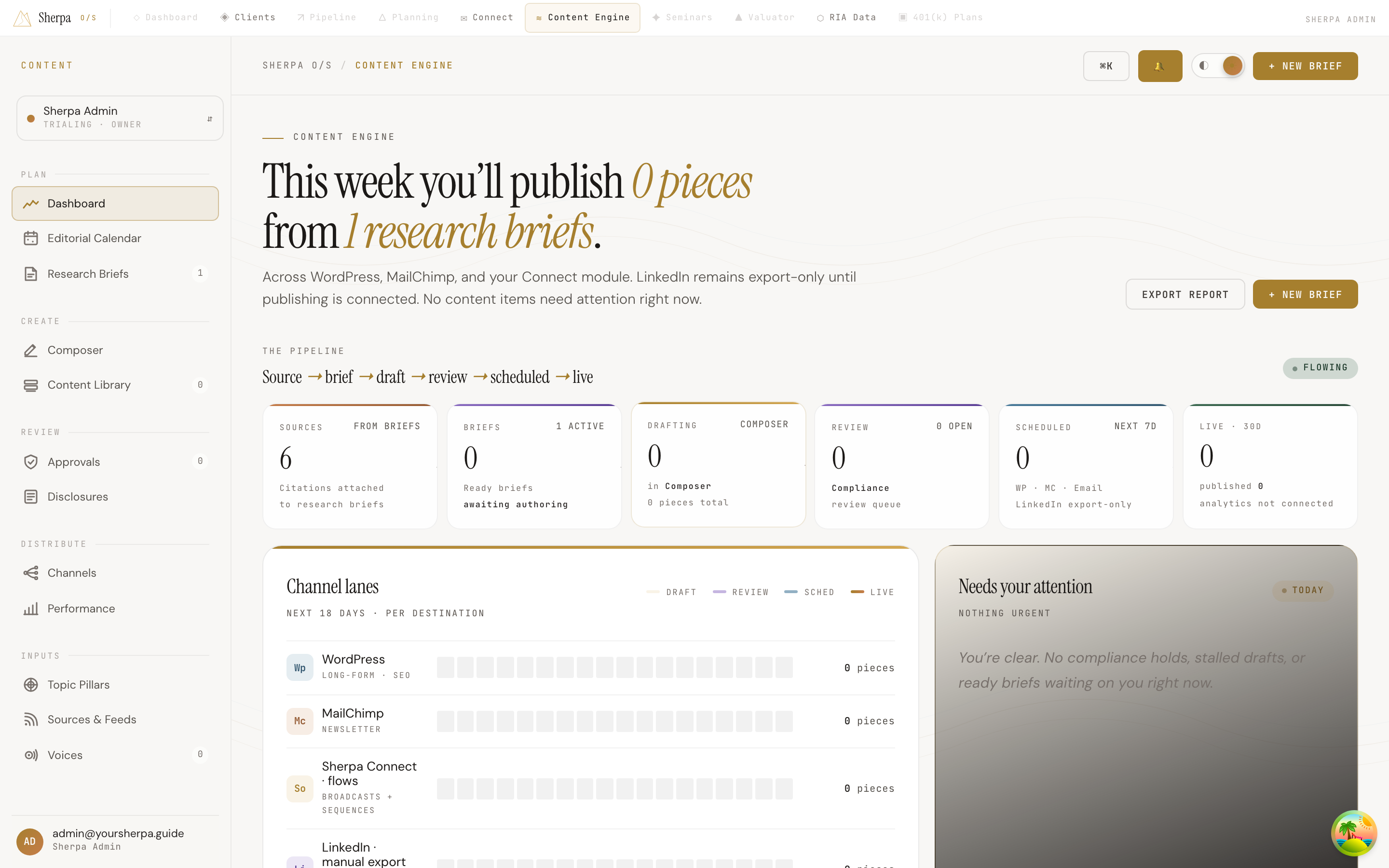
The Content Engine dashboard is your at-a-glance view of the entire content pipeline, from research briefs through compliance review and out to live channels. It is designed for advisors who want to stay on top of what is scheduled this week, where pieces are stalled, and what needs action today.
Getting there
Section titled “Getting there”In the left-hand navigation, open Content Engine, then select Plan. The dashboard is the default screen in that section.
What you can do
Section titled “What you can do”Read your weekly headline
Section titled “Read your weekly headline”The top of the page shows how many pieces are scheduled to publish this week and how many research briefs are currently active. A short subtitle tells you which channels are in use and flags how many items need your attention right now.
Two buttons sit in the upper-right corner:
- Export report — downloads a snapshot of your current content status.
- + New brief — takes you directly to the briefs screen to start a new research brief.
Follow the pipeline
Section titled “Follow the pipeline”The pipeline strip tracks every piece of content through six stages: Source → Brief → Draft → Review → Scheduled → Live. Each stage shows a live count:
- Sources — citations attached to active research briefs.
- Briefs — the number ready and awaiting authoring.
- Drafting — pieces currently open in Composer.
- Review — pieces in the compliance review queue.
- Scheduled — pieces queued to publish in the next seven days.
- Live (30d) — pieces published in the trailing 30 days.
Check channel lanes
Section titled “Check channel lanes”The Channel lanes panel shows the next 18 days of content activity broken down by destination: WordPress (long-form/SEO), MailChimp (newsletter), Sherpa Connect flows (broadcasts and sequences), and LinkedIn (draft/export only). Each lane uses color-coded blocks to show pieces in draft, review, scheduled, or live status at a glance.
Act on what needs attention
Section titled “Act on what needs attention”The Needs your attention panel surfaces items sorted by urgency. Four alert types appear here:
- Compliance hold — a piece is waiting on compliance review; click to open it in Composer.
- Brief ready — a brief has enough sources reviewed and is ready to author.
- Draft stale — a draft has not moved in several days.
- Rejected — a piece was sent back with rework notes.
If nothing is pending, the panel shows a clear confirmation so you know you are up to date.
Review active briefs
Section titled “Review active briefs”The Active research briefs table lists up to six briefs with their current stage, source count, and claim count. Click any row to open that brief. Select All briefs → to see the full list.
Navigate to other sections
Section titled “Navigate to other sections”Four quick-navigation tiles at the bottom link to Briefs, Calendar, Library, and Performance so you can move deeper into the Content Engine without returning to the sidebar.