Campaigns
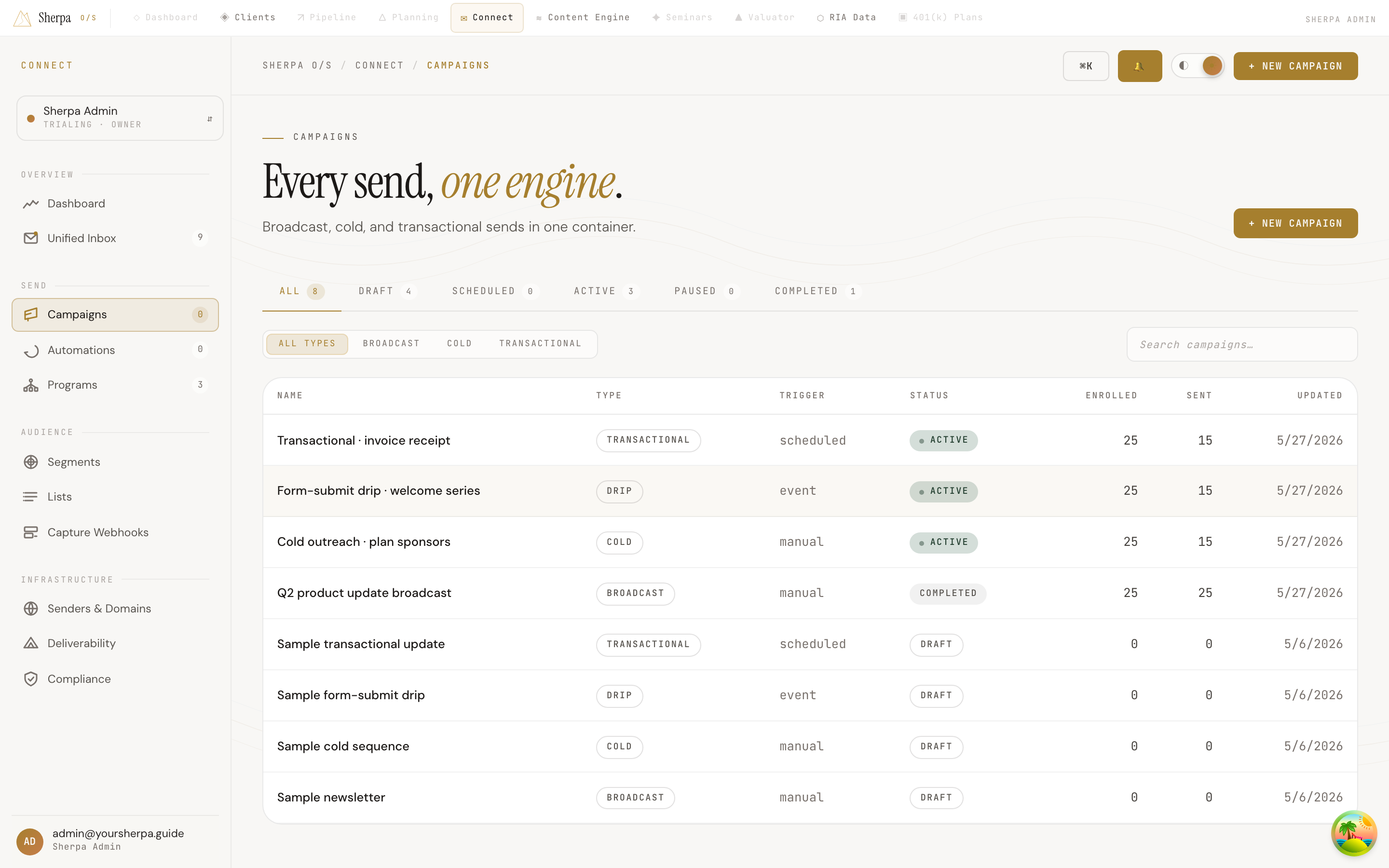
The Campaigns screen gives you a single place to manage every email send — one-time broadcasts, cold outreach, drip sequences, and transactional messages — without switching between separate tools.
Getting there
Section titled “Getting there”In the left navigation, go to Connect, then Sends, then Campaigns.
What you can do
Section titled “What you can do”Browse and filter your campaigns
Section titled “Browse and filter your campaigns”The screen opens to a full list of your campaigns. Use the tabs across the top to narrow by status:
- All — every campaign regardless of state
- Draft — started but not yet sent or scheduled
- Scheduled — queued to send at a future time
- Active — currently sending (the chip pulses green in the table)
- Paused — temporarily stopped
- Completed — finished sending
Each tab shows a live count so you know at a glance how many campaigns are in each state.
Below the tabs, a type filter lets you narrow further by Broadcast, Cold, or Transactional. Selecting “All types” shows everything.
Use the Search campaigns field on the right side of the toolbar to find a specific campaign by name. Results update as you type.
Read the campaign table
Section titled “Read the campaign table”Each row shows:
| Column | What it tells you |
|---|---|
| Name | Campaign name; if it belongs to a Program, a linked chip appears next to the name |
| Type | Broadcast, Cold, Drip, or Transactional |
| Trigger | How the campaign is started (schedule, event, etc.) |
| Status | Current state with a color-coded chip |
| Enrolled | Total contacts added to the campaign |
| Sent | Emails successfully sent |
| Updated | Date the campaign was last modified |
Click any row to open that campaign’s detail view.
Create a new campaign
Section titled “Create a new campaign”Select + New campaign in the top-right corner to open the campaign builder.
Load more
Section titled “Load more”If you have more campaigns than fit on the initial page, a Load more button appears at the bottom of the table. Select it to fetch the next page.